Placements and Dimensions
Change History
| Id | Subject | Date |
| Latest Commit | Complete rework of wire protections after clarification of Node- & SegmentLocations (#935) | 2026-01-28 |
| Clarified semantic difference between SegmentLocation and NodeLocation. | 2025-12-22 |
A Placement defines the way how a component is associated to the topology. The following sections contain examples about the different types of placements.
Semantic Difference: SegmentLocation vs. NodeLocation
Disclaimer: This page or section is currently under review by the community.
The content of this page or section can be subject to change at any time. If you find any issues or if you have any review comments please drop us an issue in our Issue Management on GitHub.
This page or section resolves #935
The VEC has two different concepts to define locations in the topology: SegmentLocation and NodeLocation. On the first glance it seems that there is a semantic overlap between these two concepts, since a TopologySegment starts and ends at a TopologyNode, so where is the difference between a SegmentLocation with an offset of 0mm (or a value equal to the segment length) and a NodeLocation at the corresponding TopologyNode? The figure below illustrates the scenario:

A SegmentLocation is used to define a location somewhere “on” a TopologySegment, even if it is at the very beginning or end of the segment. This means that the location has a clear reference to a specific single segment. This is especially important, if mulitple segments are connected to the same node (e.g. a branching point). In this case a SegmentLocation with an offset of 0mm or segment length clearly defines on which segment the location is placed. In contrast a NodeLocation always refers to the TopologyNode itself, without any reference (or preference) to a specific segment. This means that a NodeLocation is used, if the location is really “at” the node, independent of the connected segments.
SegmentLocations for component whe the placement has a clear association to specific TopologySegment, even if the location is (infinitesimal) close to a TopologyNode. Use NodeLocations for components which are really placed “at” a TopologyNode, independent of the connected segments.Placement on Areas (Wire Protection)
One common use case when placing components in the topology is the covering of specific area of the wiring harness with that component, either for protection or cohesion (e.g. a tubing, spiral wrap, or tape). The following sections illustrate how such placements can be modelled in the VEC, both without and with dimensions.
Basic Wire Protection

This diagram illustrates the placement of a basic wire protection as shown in next diagram.
Please note that the depiction of the TopologyNodes is for visualization purposes only. In the logical topology model of the VEC, they do not have any spatial extent. For this reason, both the dimensions and the SegmentLocation are shown at the center of the node (i.e. at the end of the TopologySegment).
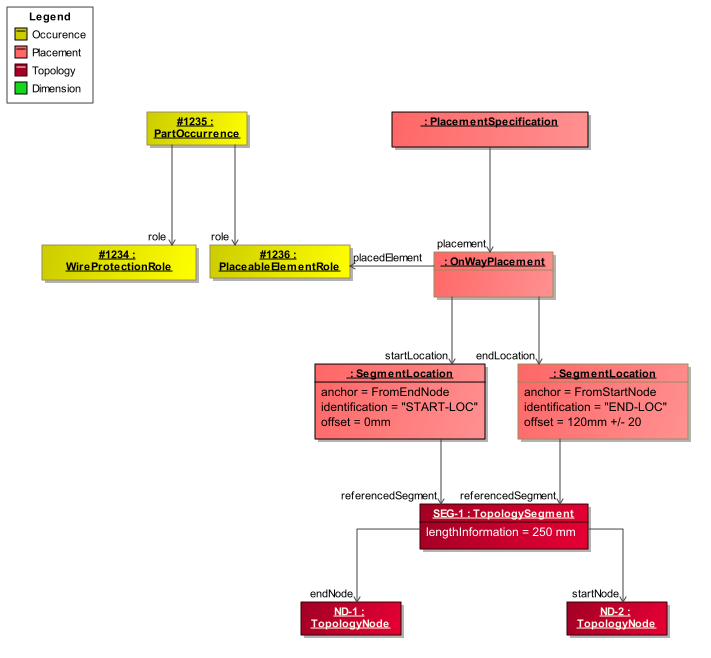
The figure above illustrates the placement of a basic wire protection. The PartOccurrence is placed using an OnWayPlacement via a PlaceableElementRole, meaning that the component covers a linear section of the harness topology. The start and end of this protected area are defined by two Locations.
Since a wire protection is, from a semantic point of view, inherently associated with a TopologySegment, it is typically placed using SegmentLocations rather than a NodeLocation. This becomes particularly relevant at TopologyNodes where multiple segments meet: a NodeLocation would not clearly express which segment the protection refers to (see also the section “Semantic Difference: SegmentLocation vs. NodeLocation”).
In the shown example, the EndLocation is a SegmentLocation located on a TopologySegment at an offset of 120 mm measured from the StartNode. The StartLocation is also defined by a SegmentLocation at the opposite end of the same segment.
It is important to note that the choice of the Anchor in a SegmentLocation carries a distinct semantic meaning. For instance, the start location in the diagram can be expressed either by Offset = 0 with Anchor = "FromEndNode" or equivalently by Offset = SegmentLength = 120 mm with Anchor = "FromStartNode". While both variants yield the same geometric position in the current state of the product, their engineering semantics differ significantly.
In the representation used in the figure, the two locations refer to different reference nodes (one to the start node, the other to the end node). This decouples the definition of the protected area from the absolute segment length and ensures that the complete segment (minus the defined offsets) is always covered, even if the segment length changes. If, in contrast, both locations were defined relative to the same reference node (e.g. both with Anchor = "FromStartNode"), the protected region would be spatially fixed and would not adapt to changes in the segment length.
StartLocation and an EndLocation in the OnWayPlacement, the placement does not imply any directionality of the placed component along the topology. The two roles of start and end are solely used to identify the locations unambigiously. It could have been named differently as well (e.g. LocationA and LocationB), without changing the semantics of the placement. For component types where direction matters (e.g. windings, tapings), additional attributes or relationships within the corresponding roles are used to define the orientation of the component along the topology (see for example the attribute TapingDirection in the class TapeRole).Wire Protection with Dimension

The illustration above extends the previous example by adding a Dimension. In the earlier example, the EndLocation of the wire protection was defined using a tolerance value. This approach can be applied if the tolerance is specified with respect to the adjacent TopologyNode (i.e. the StartNode or EndNode of the TopologySegment).
In most cases, however, the purpose of dimensions is to define measurable quality characteristics. To make them verifiable, they must refer to points that are physically perceptible and measurable on the actual product. In the illustration above, this is not the case for the topology node ND-2, since it is not recognizable in the end product (all wires pass through and no component is located there). In contrast, ND-3 is physically identifiable, as a branching occurs in the harness at this point. The green dimension therefore specifies that the valid distance from this branching point to the start of the wire protection shall be 220 mm with a tolerance of ±20 mm.
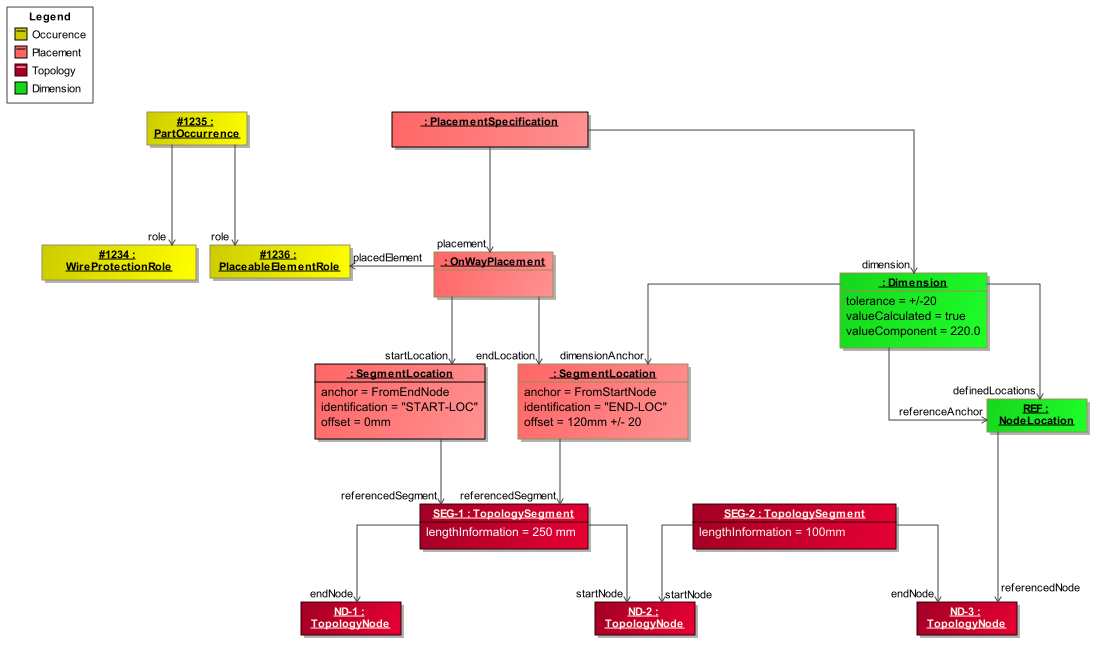
The placement of the WireProtection is identical to that in the previous example and is now extended by a Dimension (highlighted in green). This Dimension specifies a tolerance of ±20 mm between the TopologyNode ND-III and the beginning of the WireProtection. The tolerance is explicitly defined in this dimension in order to avoid tolerance accumulation in dimension chains.
The fact that the Dimension is defined between the TopologyNode and the start of the WireProtection is expressed by directly referencing the TopologyNode via a contained NodeLocation. The SegmentLocation used as the DimensionAnchor is identical to the one used for the placement of the WireProtection, thereby ensuring a consistent geometric and semantic reference.
The flag ValueCalculated = true of the Dimension indicates that the ValueComponent (220 mm) is a derived and calculated value rather than a user-defined one. It can be obtained from the placement information in combination with the lengths of the corresponding TopologySegments.
Wire Protection covering multiple Topology Segments
In some cases it is necessary to place a wire protection over a greater area of the topology, consisting of more than one TopologySegment (e.g. Tubes with a fixed length). This is illustrated in the following example:

In the VEC such a wire protection is modelled with a OnWayPlacement. The StartLocation and EndLocation are defined similar to the previous examples. The difference is that a Path is defined for the way inbetween the locations, that can cover multiple TopologySegments. This is illustrated in the next diagram:
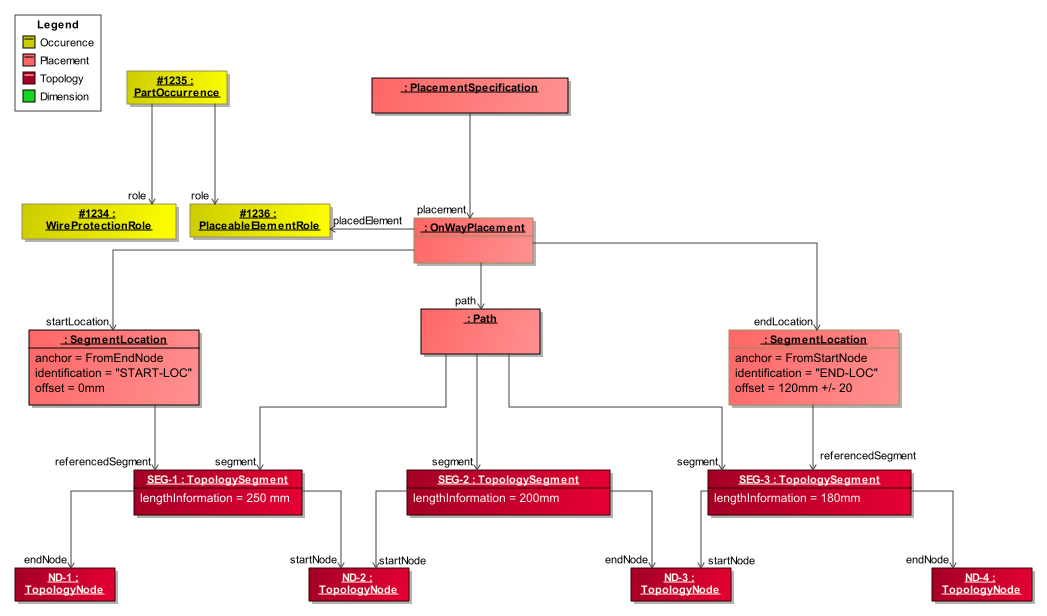
The Path is an ordered list of the segments from the start to the end. If a SegmentLocation is used for the start and/or the end, the path must contain these TopologySegments as well.
Placement on Points
The other common use case when placing components in the topology is the placement of components fixed to specific points in the topology, such as connectors, fixings, and so on. The following sections illustrate how such placements can be modelled in the VEC, both without and with dimensions.
For components that are placed on specific points, the Placement defines an association of a reference point on the component (the PlacementPoint) to a specific point in the topology (the Location). The exact postion of the PlacementPoint on the component is defined in the components PlaceableElementSpecification. For most components types specific conventions exists, which point on the component is used as PlacementPoint.
Single Locations
The most common case for point-based placement is the assignment of a component to a single Location. Such components can be placed either on a TopologyNode or on a TopologySegment. Depending on the component type, additional constraints may apply. For example, connectors shall only be placed on topology nodes; placing them on a segment would imply a wire ending in the middle of the segment, which would violate the definition of a TopologySegment. The following figure illustrates these concepts:

The diagram below illustrates the instantiation of the example in the preceding diagram.
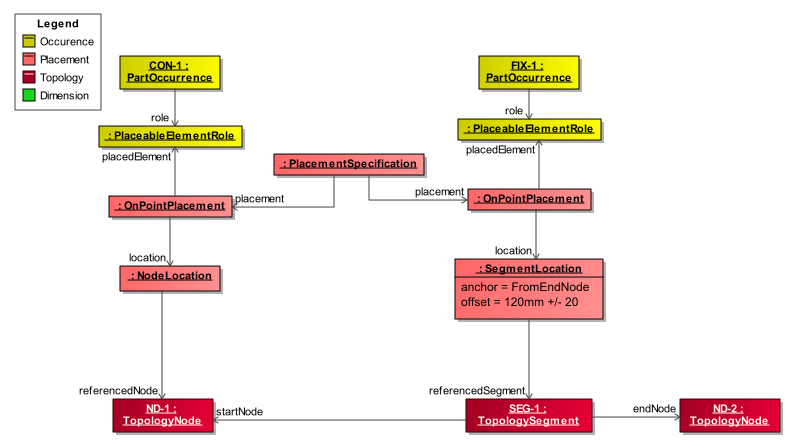
As shown in the figure above, the PartOccurrence is placed using an OnPointPlacement that references the a PlaceableElementRole of the PartOccurrence. The location where it is placed is defined by a single Location. For components that are placed on a TopologySegment, a SegmentLocation is used. For components that are placed on a TopologyNode, a NodeLocation is used.
The explicit definition of the PlacementPoints in the PlaceableElementSpecification and the PlacementPointReference in the PlaceableElementRole is not mandatory for components that are only placed at a single location. However, it is recommended to define them anyway, as it improves the clarity of the model and allows for easier extension in the future (e.g. if the component is later placed at multiple locations).
Multiple Locations with Dimensions
In addition to simple placements at single locations, significantly more complex scenarios also exist. One such scenario is illustrated in the following figure.

The figure shows a bracket featuring two guides through which two TopologySegments can pass. These guides are represented by the placement points A and C. In the shown example, the bracket is positioned in the topology by assigning these placement points to SEG-1 and SEG-2 using SegmentLocations.
For quality assurance, however, the decisive measure is the distance between a reference point in the topology (in this case the TopologyNode ND-2) and another functionally significant point of the bracket, for example the pin by which the bracket is fixed to the vehicle body. This point is not relevant for establishing the connection to the topology and is therefore not used as a placement point. Instead, it is defined as a MeasurementPoint . In the figure, this point is labeled as MeasurementPoint B. The dimension indicated in green specifies the required distance between this measurement point and the TopologyNode ND-2, along with the associated tolerance.
For this example, a bracket is used. However, similar scenarios can also arise with other component types, such as connectors, grommets or cable ducts that have multiple connection points to the topology and additional functionally relevant points that need to be dimensioned. The nature of those points can vary depending on the component type. For instance, in connectors, the SegmentConnectionPoints are used as placement points, while for grommets, the CableLeadThroughOutlets serve this purpose.
The following diagram illustrates the instantiation with VEC classes of the example in the preceding diagram.
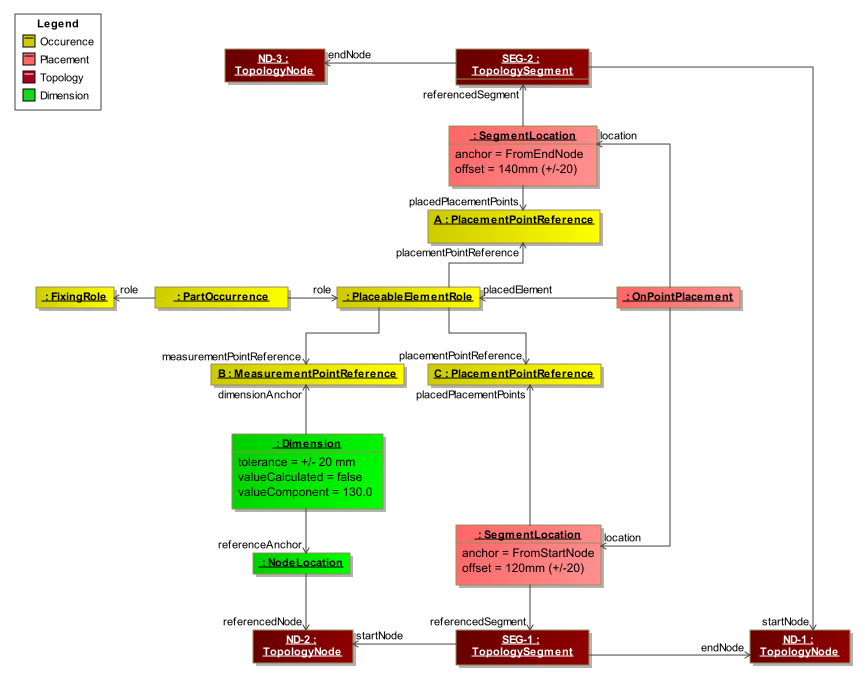
Please note that the actual definition of the PlacementPoints and MeasurementPoints is done in the PlaceableElementSpecification of the part master definition (not shown in the diagram for clarity). The PlacementPointReferences A and C in the PlaceableElementRole create the relationship between the placement points defined in the component specification and the locations in the topology. The MeasurementPointReference B in the PlaceableElementRole creates the relationship between the measurement point defined in the component specification and the dimension defined in the placement.
It can also be seen, that the ValueCalculated-attribute of Dimension is set to false, indicating that the dimension value is explicitly defined. Since a MeasurementPoint is an arbitrary point on the component the dimension value can not be derived from topology and placement information alone.
Default Dimensions
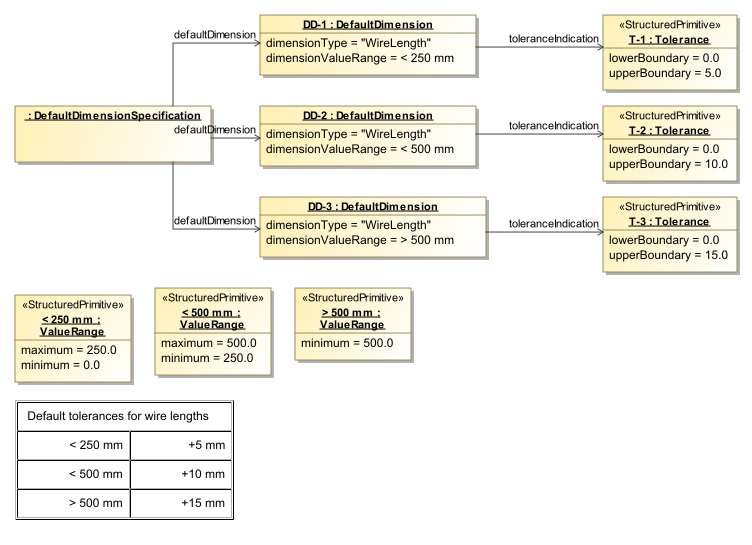
The diagram illustrates the use of a DefaultDimensionSpecification. The DefaultDimensionSpecification can be used to specify default dimensions / tolerances for certain attributes and ValueRanges. In this examples the Specification is used for the length of wires. (indicated by the dimensionType). The dimensionValueRange defines for which value’s of this type, the referenced Tolerance is applicable.
In this example for a wire length lower than 250 mm a Tolerance of +5 mm is allowed, for values between 250 mm and 500 mm a Tolerance of +10 mm is allowed and for everything above 500 mm a Tolerance of 15 mm is allowed.